
Planning Center has no official WordPress plugin, so everything here is third party and the approaches differ more than the marketing suggests. Some produce real pages on your site. Some produce a box. Knowing which is which before you install something saves an unpleasant discovery later.
The approach that doesn't work
Start by ruling one out. Zapier ranks near the top of Google for this, and Zapier can't do it. Its Planning Center integration offers six triggers and no actions, and not one of those triggers is Groups. There is no supported way to move group data out of Planning Center through a Zap.
Embedded widgets
A widget is a snippet you paste into a page. It works on any platform, it needs no plugin, and it's the fastest thing to set up.
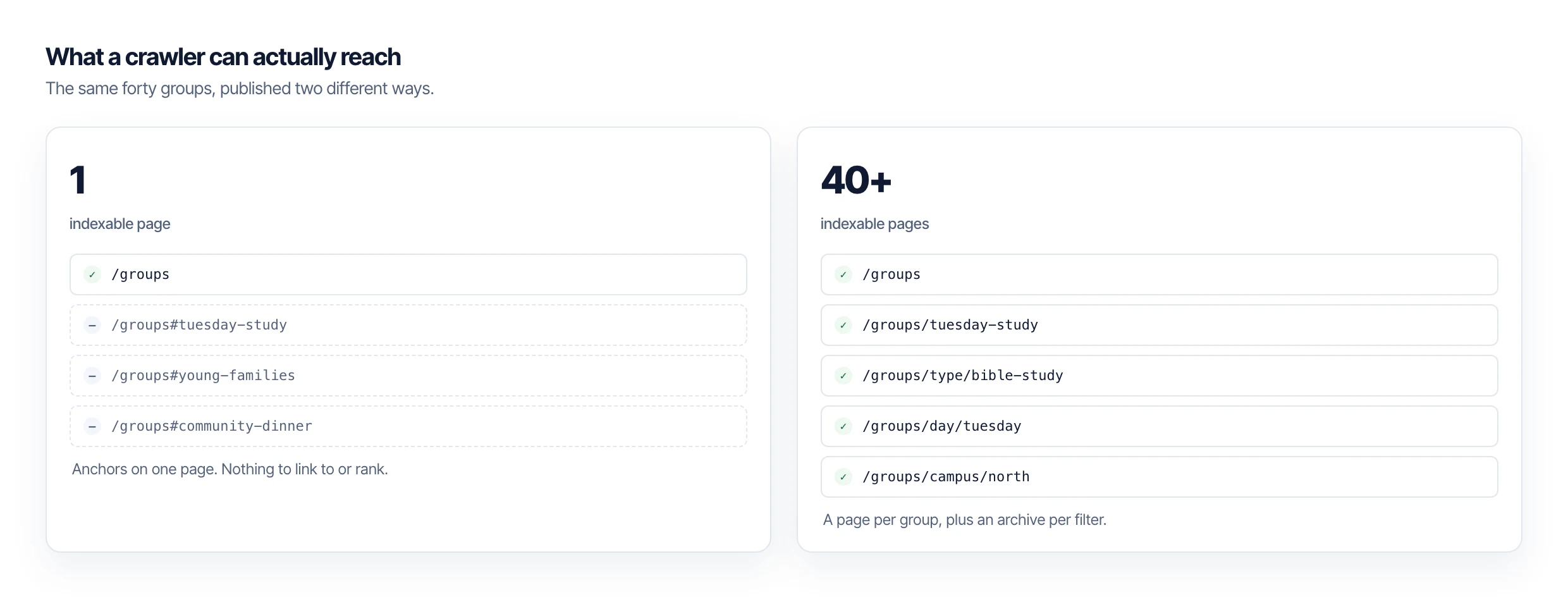
What it produces is a single page with a script on it. Groups get injected after the page loads, so the HTML your server sends contains no group content, and individual groups generally have no URL of their own. If somebody wants to link to one specific group, there's usually nothing to link to.
Plugins that sync into WordPress content
The other approach imports groups into WordPress itself, as posts, using a custom post type. Your theme renders them, WordPress serves them, and each group has a permalink like any other page on your site.
That's the approach PCO Bridge takes. Published groups become posts of type pco_group, each with its own URL, plus archive pages generated from four taxonomies: group type, tag, meeting day, and campus. A church with forty groups ends up with considerably more than forty indexable pages.
Because the pages are ordinary WordPress content, they work with your theme, your search, your sitemap plugin, and your caching. There's nothing special about them from WordPress's point of view, which is the point.
The question that sorts them
Whatever you're evaluating, ask the vendor one thing: does each group get its own URL on my domain?
If yes, you're looking at content. If the answer involves anchors, a single page, or a link to a church management system, you're looking at a display layer. Both are legitimate products, they just solve different problems, and only one of them puts anything on your site that search engines can rank.
What about joining?
Joining stays in Church Center regardless of which route you pick. Planning Center owns membership and group rosters, and a plugin that tried to take that over would be fighting the system it depends on. What moves onto your site is discovery.
PCO Bridge is in beta and applications are open to churches, developers, and agencies.