
Your groups are on the page. You can see them in the browser. And Google still has nothing, because the page your server actually sends probably doesn't contain a single group name.
That gap between what you see and what gets sent is the whole problem, and you can check it yourself in about a minute.
Run the test on your own site
Open your groups page, right-click, and choose View Page Source. That's the HTML your server sent, before any JavaScript ran. Now use Ctrl+F or Cmd+F and search for the name of one of your groups.
If you find it, your groups are real content and this post isn't about you. If you don't, your groups are being injected by a script after the page loads, and search engines are working from the version without them.
What a widget actually sends
We ran that test against a widget vendor's own public demo page in September 2026. The static furniture of the page came through fine: section headings, the words Simple List Groups Widget View, all present in the served HTML. The group names were not. Not one of them appeared in the source, though every one rendered in the browser.
The links told the same story. Individual groups didn't point anywhere on the site you were reading. They pointed at a church management system on a different domain entirely, and everything else was an anchor jump on a single page.
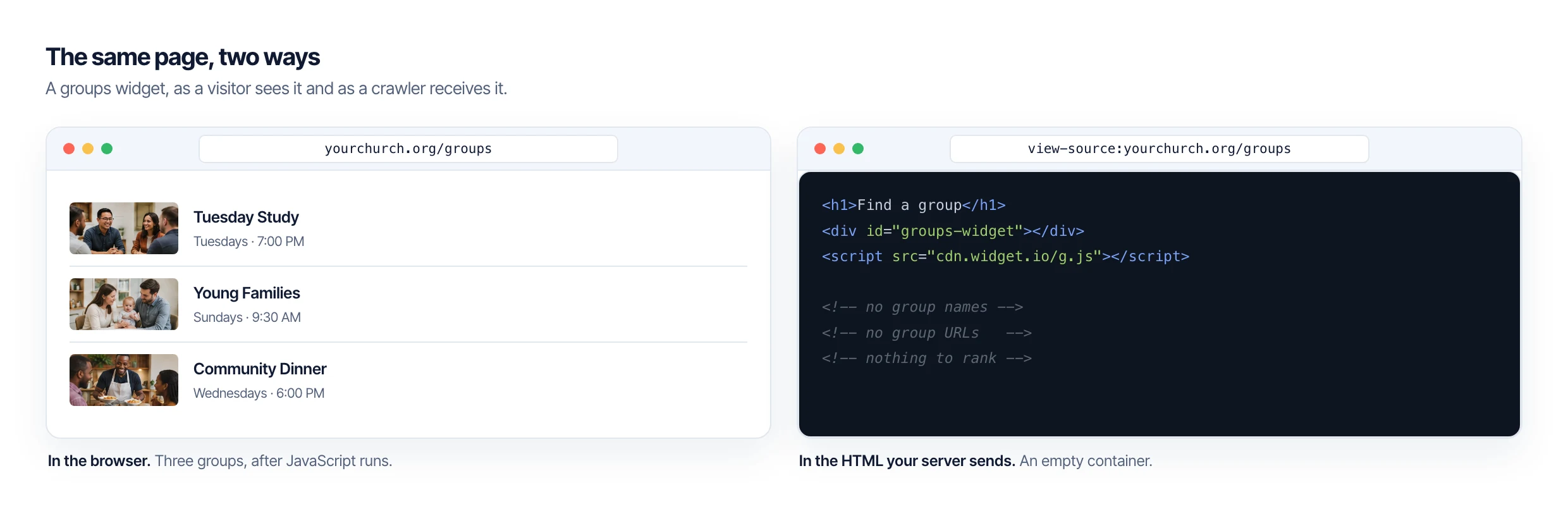
So a church running that setup has one page about groups. Not forty pages, one, and the only thing on it that a crawler can read is the heading above an empty container.
Why that costs you
Google can execute JavaScript, and sometimes it does. Rendering is a second pass that happens later and isn't guaranteed, so content that only exists after a script runs is content you're gambling on.
The deeper issue isn't rendering, though. It's that there's nothing to rank. Ranking needs a URL, and a group that lives behind an anchor on a shared page has no address of its own. Nobody can link to it, you can't share it in an email, and Google has no page to put in a result.
Somebody searching for a Tuesday night men's study in your town is looking for a page. If your site doesn't have one, a directory site or a neighboring church will.
What a real group page looks like
Each group gets its own address, something like yourchurch.org/groups/tuesday-mens-study. It has a title, a description, meeting details, and a place in your sitemap. It renders on your server, so the content is in the HTML before any script runs.
You also get archive pages for free: every group type, every meeting day, every campus, each with its own URL. A church with forty groups ends up with well over forty indexable pages instead of one.
That's what PCO Bridge builds. Your published Planning Center groups become real posts on your own site, in your own theme, and Planning Center stays the place you manage them.
Try the test first
Before you change anything, go run View Page Source on your own groups page and search for a group name. Whatever you find tells you more than any vendor comparison will.
PCO Bridge is in beta and applications are open to churches, developers, and agencies.